Guide to Power Conversion and Quality
From AC Wall Power to DC Components
An explanation of how AC power is converted into stable DC power, the importance of power quality, and the role of filtering components.
1 Purpose
This document explains how the Alternating Current (AC) from a wall outlet is converted into the stable, low-voltage Direct Current (DC) that computer components require. It also introduces the concept of power quality and the components used to filter “dirty” power.
2 What You’ll Learn
By the end of this reading, you will be able to:
- List the four main stages of AC-to-DC conversion.
- Identify common power quality issues like electrical noise, spikes, and sags.
- Describe the role of components like capacitors and inductors in filtering power.
NoteLearning Outcomes
This reading maps to the following program and course learning outcomes:
- Program Learning Outcomes (PLOs):
- 3. Apply terminology and numeric or system concepts: This document explains the concepts and terminology of power conversion, filtering, and power quality.
- Course Learning Outcomes (CLOs):
- 1. Identify hardware and basic network components: This guide details the function of the internal components within a power supply unit.
- 3. Troubleshoot hardware and basic network components: Understanding power quality is essential for diagnosing system instability that is not caused by the computer itself.
TipLearning Objectives, KSAs, and Technologies
This exercise will help you develop the following skills and knowledge, which align with the O*NET SOC Code 15-1232.00 for Computer User Support Specialists.
| Learning Objective | O*NET KSAs | Technologies Used |
|---|---|---|
| Describe the stages of AC-to-DC conversion. | Knowledge: Computers & Electronics, Physics Skills: Reading Comprehension |
N/A (Conceptual) |
| Identify common power quality issues. | Knowledge: Computers & Electronics Skills: Troubleshooting Abilities: Problem Sensitivity |
Power Conditioners, UPS |
3 From the Wall to the Board
As we learned previously, AC power is efficient for long-distance transmission, but nearly all digital electronics, including every component in your PC, require stable, low-voltage DC power. The job of converting between the two falls to the computer’s Power Supply Unit (PSU).
This conversion happens in four main stages.
There are two primary methods for this conversion: older, simple Linear Power Supplies and modern, efficient Switch-Mode Power Supplies (SMPS). The following section describes the classic four-stage process used in a linear supply, as it is the easiest to understand. It is important to know, however, that virtually all modern computer PSUs are switch-mode designs, which are more complex and will be discussed in a later document.
3.1 The AC-to-DC Conversion Process
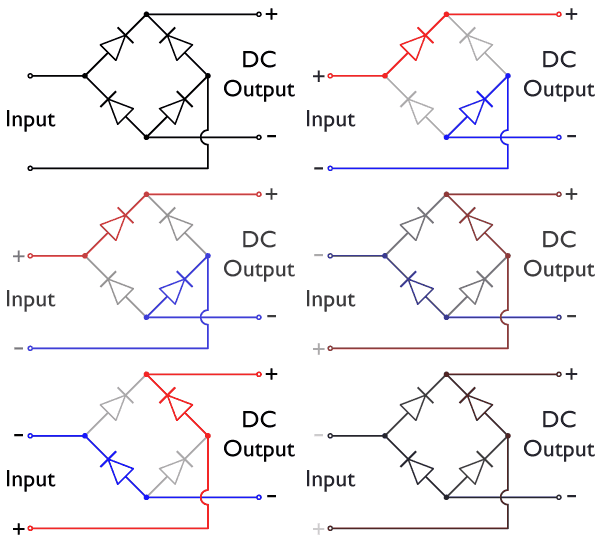
Image credit: Teslaton via Wikimedia Commons, CC BY-SA 4.0
Transformation: The transformer (left) steps the high voltage from the wall outlet (e.g., 120V AC) down to a much lower AC voltage. Crucially, it also provides electrical isolation, meaning there is no direct electrical connection between the high-voltage wall power and the low-voltage side. This is a key safety feature that separates the computer’s internal components from the dangerous mains voltage.
Rectification: The four diodes in a “bridge” configuration (center) redirect the flow of the AC sine wave. It essentially “flips” the negative half of the AC wave into the positive range, converting it into a pulsating DC signal, as shown in the animation below.
- Filtering: The pulsating DC from the rectifier is not yet clean enough for sensitive electronics. A filter, primarily made of large capacitors (right, marked C), smooths out these pulses, acting like a reservoir to fill in the gaps and create a much more stable, linear DC voltage.
- Regulation: Finally, a voltage regulator circuit ensures that the output DC voltage remains constant under varying loads. Whether the computer is idle or running at full power, the regulator ensures the +12V, +5V, and +3.3V rails remain within their specified tolerances.
Four Stages at a Glance: Transformation → Rectification → Filtering → Regulation.
These stages work together to turn the wall outlet’s high-voltage AC into the stable DC rails your computer needs.
3.2 Power Conversion Methodologies
The process described above details a Linear Power Supply. It is simple and produces very clean DC power, but it is inefficient because the large transformer and the regulator dissipate a lot of energy as heat. This is why old power adapters were often large, heavy bricks that got very warm.
Linear Power Supplies in Computers
Early desktop computers and many consumer electronics from the 1970s and 1980s relied on linear supplies. Because the transformer operates directly at the 50/60 Hz mains frequency, it must be large enough to handle the full power load. The resulting supplies are:
- Heavy and bulky: The transformer core and windings dominate the chassis.
- Heat-intensive: Excess voltage is “burned off” as heat in the regulator stage, often requiring large heat sinks.
- Electrically quiet: With relatively few high-frequency components, linear supplies produce extremely low noise on the DC output.
Even today, linear supplies remain in use for low-power audio gear and test instruments where simplicity and low noise are more important than efficiency.
Switch-Mode Power Supplies (SMPS) in Computers
Modern computers use a much more efficient and complex method called a Switch-Mode Power Supply (SMPS). The process is fundamentally different:
- Rectification First: Instead of stepping down the voltage first, an SMPS immediately rectifies and filters the high-voltage AC from the wall into high-voltage DC.
- Switching (or “Chopping”): A high-speed electronic switch turns this high-voltage DC on and off thousands of times per second, creating a high-frequency square wave, as shown below.
- Transformation: This high-frequency square wave is fed into a much smaller, lighter, and more efficient transformer.
- Rectification and Filtering: The low-voltage AC output from the tiny transformer is then rectified and filtered one last time to produce the final, stable DC voltages needed by the computer.
Why SMPS Replaced Linear Designs in PCs
While more complex and capable of producing high-frequency noise if not designed well, SMPS technology offers decisive advantages for computer builders:
- Efficiency: Switching regulators waste far less power as heat, leading to higher overall PSU efficiency ratings (80 PLUS, Titanium, etc.).
- Compact size and weight: High-frequency transformers can be much smaller, enabling lighter, more compact PSUs.
- Wide input range: SMPS units can automatically adapt to 100–240 V inputs with minimal redesign, simplifying global distribution.
- Tight voltage regulation: Feedback circuits react quickly to rapid load changes from CPUs and GPUs, keeping line voltages within tolerance.
These benefits made SMPS the universal standard for modern computer power supplies, with linear supplies reserved for niche use cases where their simplicity or low noise outweighs the downsides.
3.3 Power Quality
The power coming from a wall outlet is not always a perfect, clean sine wave. It can be affected by issues on the power grid or by other devices in the building. This is often called “dirty power.”
- Electrical Noise: High-frequency interference that can be introduced into the power line.
- Voltage Spikes (Surges): Short, transient bursts of high voltage. These can be very damaging to electronic components.
- Voltage Sags (Brownouts): A temporary drop in voltage, which can cause a computer to unexpectedly reboot or shut down.
In the U.S., the normal root mean square (RMS) voltage range for standard household outlets is 114 V to 126 V, centered around a nominal 120 V. A voltage fluctuation that falls outside of this range defines either a surge or a sag, depending on the direction of the change.
3.4 The Role of Filtering Components
Power supplies and external devices like surge protectors and Uninterruptible Power Supplies (UPS) use several components to ensure good power quality.
- Capacitors: These are excellent at smoothing out voltage ripples and absorbing very short-duration voltage spikes.
- Inductors (Chokes): A coil of wire that opposes changes in current. Inductors are very effective at filtering out high-frequency AC noise from a DC line.
- Metal Oxide Varistors (MOVs): These are sacrificial components found in surge protectors. They absorb large voltage spikes to protect the connected devices. A large enough surge will destroy the MOV, which is why surge protectors should be replaced after a major electrical event.
4 Reflect and Review
ImportantReflection: 3-2-1
Now that you have reviewed this document, take a moment to reflect on your learning. In your Microsoft Teams Student Notebook, create a new page for this topic and write down the following:
- 3 insights about the four-stage AC-to-DC conversion process (transformation, rectification, filtering, regulation).
- 2 observations that compare how linear supplies and SMPS handle voltage conversion.
- 1 question you still have about managing power quality issues such as noise, spikes, or sags.
This reflection is for your instructor to review and helps solidify your understanding of the concepts.
TipCheck on Learning
Test your understanding with the following questions. These questions provide retrieval practice and reinforce key concepts covered in this reading. In your Microsoft Teams Student Notebook, answer the following:
- Why must AC wall power be converted into DC inside a computer?
- How does the Transformation stage prepare power for the rest of the supply?
- What role do capacitors play during the Filtering stage?
- How does a switch-mode supply differ from a linear supply in the order of its conversion steps?
- Name two common power quality problems and describe how they can affect computer systems.
- Which component inside a surge protector absorbs large voltage spikes, and why should the protector be replaced after a major surge?