Exercise 2.3: Implementing UML Designs
1 Purpose
The purpose of this exercise is to practice translating a formal design specification into a functional code structure. You will read a Unified Modeling Language (UML) class diagram and implement the corresponding Java classes and enums as “stubs.” This focuses on the crucial professional skill of adhering to an architectural blueprint before implementing detailed logic.
2 What You’ll Accomplish
By the end of this exercise, you will have successfully:
- Interpreted a UML class diagram to identify classes, fields, methods, and relationships.
- Explained how UML acts as a language-agnostic blueprint for object-oriented code.
- Created a Java project structure with a package that mirrors the design.
- Written stub classes and enums with correct fields and method signatures.
- Explained the purpose of method stubs and the role of the
nullkeyword in them. - Compiled your code structure to ensure it is free of syntax errors and adheres to the design.
- Verified the creation of an object by observing the default
toString()output.
This exercise maps to the following program and course learning outcomes:
- Program Learning Outcomes (PLOs):
- 2. Use current tools: You will use VS Code and Maven to create and compile a Java project.
- 3. Apply concepts: You will apply object-oriented concepts like classes, enums, and inheritance.
- 4. Use system software: You will use the JDK to compile your code.
- 5. Implement solutions: You will implement a code structure based on a design.
- Course Learning Outcomes (CLOs):
- 1. Develop algorithmic solution: You will translate a visual design into a logical code structure.
- 3. Create and use data types: You will create multiple user-defined types (classes, enums).
- 4. Develop modular solutions: The implemented structure is inherently modular.
- 5. Utilize user-defined methods: You will create stubs for user-defined methods.
This exercise aligns with the O*NET SOC Code 15-1251.00 for Computer Programmers.
| Learning Objective | O*NET KSAs | Technologies Used |
|---|---|---|
| Translate a UML diagram to a Java class structure. | Skills: Reading Comprehension, Systems Analysis Abilities: Written Comprehension, Information Ordering |
Requirements analysis and system architecture software: UML |
| Create stubbed-out Java classes, methods, and enums. | Skills: Programming Abilities: Information Ordering |
Object or component oriented development software: Java |
| Compile a multi-file Java project from source code. | Knowledge: Engineering and Technology | Development environment software: Apache Maven |
3 Working from a Design Model
In a professional development team, programmers rarely start from a blank slate. Instead, they work from designs created by software architects or senior engineers. These designs ensure that all components of an application fit together correctly. The most common format for these designs is the Unified Modeling Language (UML).
It is important to understand that UML is not specific to Java. It is a standardized way to visualize the design of an object-oriented system, and the same UML diagram could be used to implement classes in Python, C#, C++, or any other object-oriented language.
This is conceptually similar to how an Entity-Relationship Diagram (ERD) is used to design a database. An ERD provides a language-agnostic blueprint for database tables, their columns, and their relationships. A developer can then use that ERD to write the specific SQL code needed to create the database in a particular system like PostgreSQL, MySQL, or SQL Server. In the same way, a UML class diagram provides a blueprint for classes, and a developer uses it to write the specific code in a language like Java.
Your task in this exercise is to act as a developer on the team and implement the initial structure for the Tasks that the Task Management app is going to manage. First, you need a little backgound on UML Class Diagrams.
3.1 UML Class Diagram Basics
A UML (Unified Modeling Language) class diagram represents a class as a rectangle with three horizontal sections:
- Top Section: Contains the name of the class (e.g.,
MyClass). - Middle Section: Lists the class’s attributes (fields or properties).
- Bottom Section: Lists the class’s operations (methods).
Each attribute and operation has a visibility symbol that defines its access level:
+Public: Accessible from outside the class.-Private: Accessible only within the class itself.
For example, in the diagram below, -privateProperty1: Long is a private attribute, while +publicMethod1(): Long is a public method. The special +MyClass() operation represents the class’s public constructor.
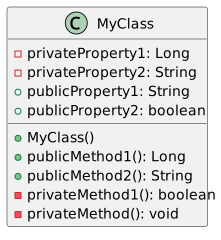
UML Class Diagram Basics.
3.2 Task Management Application Design
This diagram shows the core components of our application, including data classes (Task, TaskCategory) and service classes (TaskManager, TaskService).
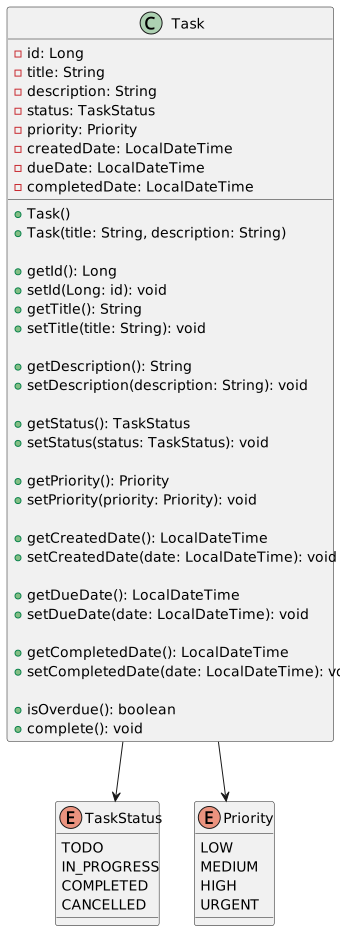
Task Design.
You can see this UML diagram online in the PlantUML live editor
4 Your Task: Refactoring to a Formal Design
In professional development, it’s common to start with a simple prototype and then refactor it to a more robust and well-designed structure. That’s what you’ll do in this exercise. You will take the simple Task.java you created in Exercise 2.1 and refactor it to match the formal UML design.
This involves replacing the old implementation with a new one that includes private fields, getter/setter methods, and more detailed properties. This process of improving the internal structure of existing code without changing its external behavior is a core professional skill called refactoring.
4.1 Create the Enums
An enumeration (or enum) is a special data type that allows a variable to be one of a set of predefined constants. This improves clarity and type safety in your code, as the variable can only hold one of the specified values.
For example, instead of representing the status of a task with a simple String (which could lead to errors like "in progress" vs. "In Progress"), an enum ensures the value is always one of the predefined constants like IN_PROGRESS.
In Java, an enum is a special type that can contain fields, methods, and constructors. For this exercise, we will create two simple enums as defined in the UML diagram.
TaskStatus Enum
Create the file TaskStatus.java inside the edu.pstcc.citc package with the following content. This enum will represent the different states a task can be in.
package edu.pstcc.citc;

public enum TaskStatus {
    TODO,
    IN_PROGRESS,
    COMPLETED,
    CANCELLED
}
Priority Enum (Student Exercise)
As an exercise, create the Priority.java enum yourself. It should be in the same edu.pstcc.citc package and contain the values shown in the UML diagram: LOW, MEDIUM, HIGH, and URGENT.
4.2 Create the Data Class
Now, create the file Task.java in the edu.pstcc.citc package. This class will hold all the information for a single task, as detailed in the UML diagram.
Notice how the Task class uses the TaskStatus and Priority enums you just created. This is a core concept of object-oriented design: composing classes from other user-defined types.
Copy the following stub code into your Task.java file.
package edu.pstcc.citc;

import java.time.LocalDateTime;

public class Task {
    // Fields based on the UML diagram
    private Long id;
    private String title;
    private String description;
    private TaskStatus status;
    private Priority priority;
    private LocalDateTime createdDate;
    private LocalDateTime dueDate;
    private LocalDateTime completedDate;

    // Constructors
    public Task() {
        // Default constructor
    }

    public Task(String title, String description) {
        this.title = title;
        this.description = description;
        this.createdDate = LocalDateTime.now();
        this.status = TaskStatus.TODO; // Default status
    }

    // Method stubs for getters and setters
    public Long getId() { return null; }

    public String getTitle() { return null; }
    public void setTitle(String title) { }

    public String getDescription() { return null; }
    public void setDescription(String description) { }

    public TaskStatus getStatus() { return null; }
    public void setStatus(TaskStatus status) { }

    public Priority getPriority() { return null; }
    public void setPriority(Priority priority) { }

    public LocalDateTime getCreatedDate() { return null; }
    public void setCreatedDate(LocalDateTime date) { }

    public LocalDateTime getDueDate() { return null; }
    public void setDueDate(LocalDateTime date) { }

    public LocalDateTime getCompletedDate() { return null; }
    public void setCompletedDate(LocalDateTime date) { }

    // Method stubs for other business logic
    public boolean isOverdue() { return false; }
    public void complete() { }
}You may notice after pasting in the code for this class that VS Code warns you about unused imports and variables. That’s okay! We’ll fix those warnings soon enough. For a stubbed-out class, it’s normal to have some unused elements until you add more functionality.
This code is a method stub. The goal is to create a class that matches the design, even if the internal logic isn’t written yet. This allows the code to compile, so that other parts of the application that might depend on this class can also be written and compiled.
Notice that methods that are supposed to return an object (like getId() or getTitle()) simply return null. This is a placeholder. We must return something that matches the required return type, and null is a valid value for any object type. Methods that have a void return type can have a completely empty body.
null Keyword
In Java, null is a special literal that represents the absence of a value or reference. It means a variable that is supposed to hold an object does not currently point to any object in memory. It is not the same as zero (0), the NUL character with binary value 0x00, or an empty string ("").
Because null can be assigned to any object reference type, it is often used as a placeholder or to indicate that an object is uninitialized or not found. However, it is also a common source of errors. If you try to call a method on a variable that holds null, your program will crash with a NullPointerException.
4.3 Test Your Code
To see your new Task class in action, you will modify the main method in your existing App.java file. This will serve as the entry point for testing your class.
Open your App.java file in the edu.pstcc.citc package and update the main method with the following code to create an instance of your Task class.
package edu.pstcc.citc;

public class App {
    public static void main(String[] args) {
        // Create a new Task object
        Task myTask = new Task("Finish Exercise 2.3", "Implement the UML diagram for the task management system.");

        // The toString() method is called automatically by println
        System.out.println("Created Task: " + myTask);
    }
}
When you run this code, you will see something like Created Task: edu.pstcc.citc.Task@15db9742 in the output. Why?
When you try to “add” (concatenate) an object to a String, Java automatically calls the toString() method on that object to get a String representation of it. Since we have not provided our own toString() method, the default version from the base Object class is used. Its behavior is to print the full class name, an @ symbol, and the object’s hash code in hexadecimal. This confirms your Task object is being created, even if the output isn’t very readable yet.
4.4 Compile and Verify
After creating all the files, open the integrated terminal in VS Code and run the following Maven command:
mvn clean compileIf the build is successful, you have correctly implemented the design structure! If you get errors, read them carefully. They are likely due to a typo, a missing file, or a class being in the wrong package. A BUILD SUCCESS message means your structure is sound and ready for business logic to be added later.
Congratulations! You have successfully translated a UML design into a verifiable Java code structure.
5 Reflect and Review
In your Microsoft Teams Student Notebook, answer the following:
- 3 key pieces of information a UML Class Diagram provides to a programmer.
- 2 reasons why creating method stubs is a useful practice in team development.
- 1 question you still have about the
nullkeyword or default object behaviors.
Answer the following questions in your Microsoft Teams Student Notebook.
- Is a UML Class Diagram only useful for Java programmers? Explain why or why not.
- What is the purpose of a “stub” method, and what value should it return if it has a non-primitive return type?
- What will happen if you try to call a method (e.g.,
.toLowerCase()) on a variable that currently holds the valuenull? - When you print an object that does not have a custom
toString()method, what information is typically displayed?